Amazon FBA Purchase Orders: The Complete Workflow Guide
Most wholesale sellers do not lose margin on a bad product. They lose it on a messy purchase order process. Late reorders, mismatched invoices, and prep fees nobody tracked until month end all quietly eat profit that looked fine on paper. Here is a workflow that closes those gaps, along with what actually happens to a business that never builds one.
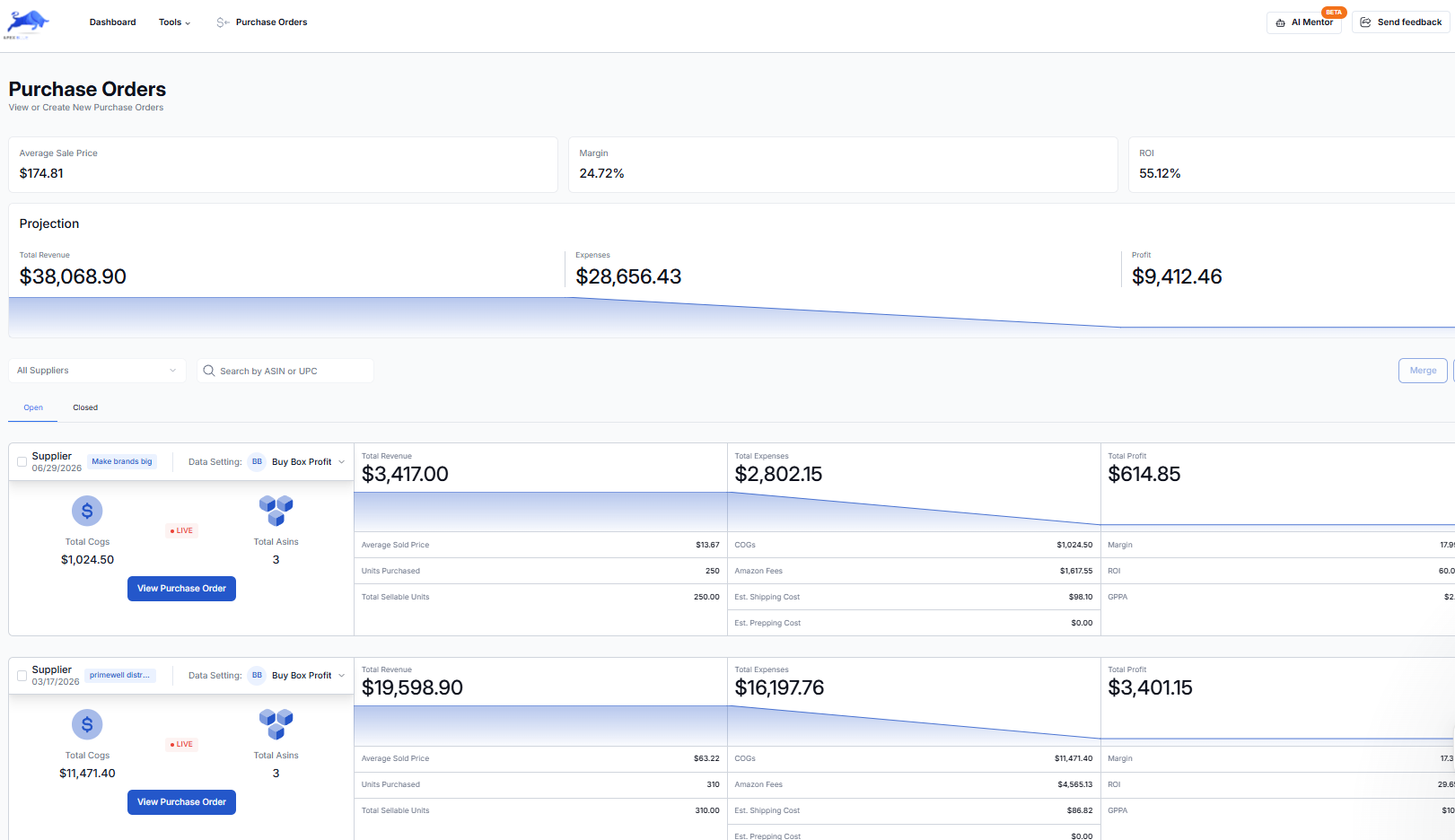
1. Decide order quantity based on real velocity, not gut feel
For a brand new SKU, order enough to get a genuine read on sell through, typically a 30 to 45 day supply based on your Keepa informed estimate, not a full pallet on a hunch. For a reorder on a proven SKU, base the quantity on your actual trailing 30 day sales velocity plus supplier lead time, so you are not stocking out while a reorder is in transit, but also not tying up six months of cash in one SKU.
2. Confirm pricing and terms before you submit the purchase order
Wholesale price lists change. Before submitting a purchase order, confirm current unit cost, any volume break pricing you qualify for, and payment terms such as prepay versus net 30 directly with the supplier. Do not work off a price list that is more than a few weeks old. This single confirmation step avoids the single most common margin surprise, which is paying more than you modeled because the price quietly moved.
3. Track the purchase order from submission through landing
A purchase order is not done when you submit it. It is done when the inventory is checked in at your prep center or Amazon's warehouse and matches what you ordered. In between, track the order date, expected ship date, and expected landing date. This is the stage where a spreadsheet starts to break down once you are running more than two or three suppliers at once, because there is no single view of what is outstanding versus what has landed. Apex Blue's purchase order tooling exists specifically to keep this in one place instead of scattered across supplier emails and separate trackers.
4. A real landed cost example
Your real cost per unit is the product cost plus inbound shipping, plus prep center fees, plus any FBA prep requirements such as poly bagging and labeling, plus Amazon's referral and fulfillment fees, not just the number on the supplier's invoice. Here is a worked example for a hypothetical 15 dollar sale price product.
| Cost component | Example amount |
|---|---|
| Wholesale unit cost | $6.50 |
| Inbound shipping (per unit) | $0.60 |
| Prep center fee (per unit) | $0.45 |
| Amazon referral fee (15%) | $2.25 |
| FBA fulfillment fee | $3.80 |
| Total landed cost | $13.60 |
| Net profit per unit | $1.40 (9.3% margin) |
That 9.3 percent margin is in the warning zone by the benchmarks in our profit margins guide. This exact kind of math, run before the purchase order instead of after, is what separates a product you should pass on from one you should double down on. Sellers who only track unit cost consistently overestimate their margin, because none of the add on costs above are small individually, but they compound fast across an order of a few hundred units.
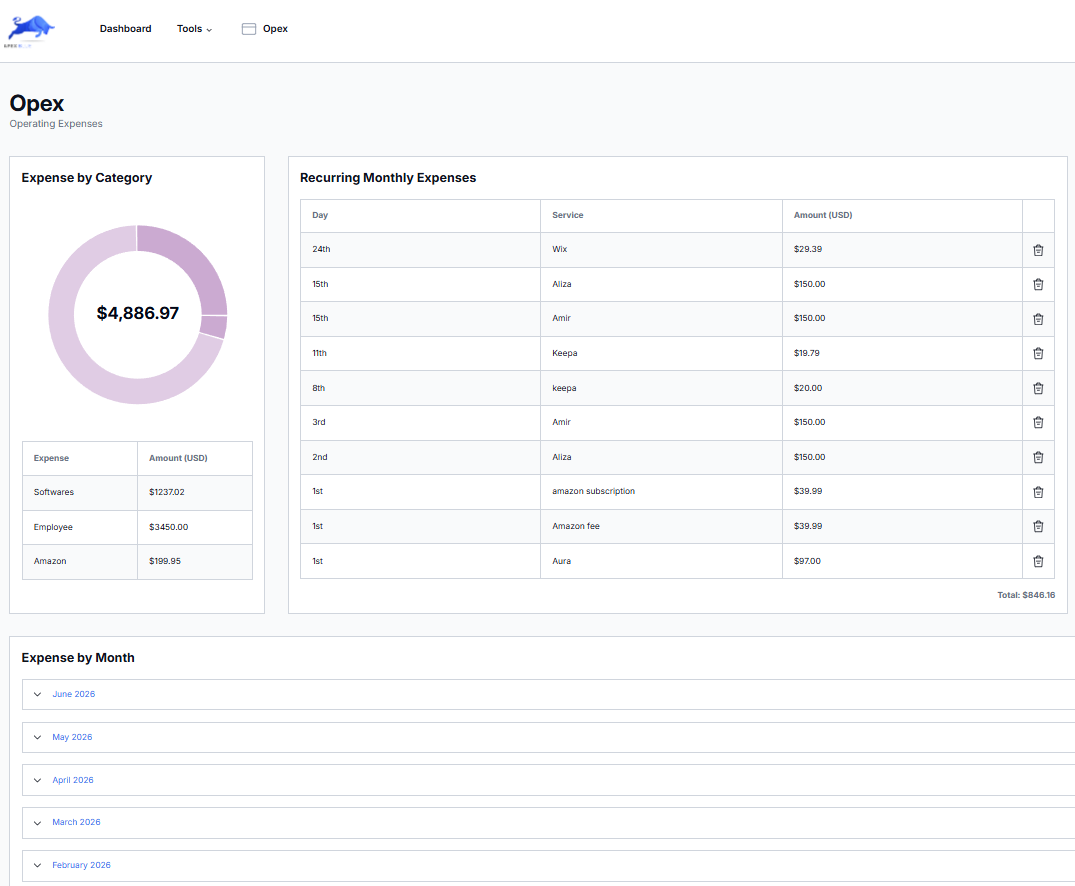
5. Reconcile what landed against what you paid for
When inventory arrives at your prep center, check it against the original purchase order before it ships to Amazon: correct quantity, correct condition, no shortages. Purchase order discrepancies, including short shipments, damaged units, and wrong items, are common enough in wholesale that catching them here, before the units are checked into FBA, is far easier than disputing them after the fact.
6. Track profit after the sale, not just before
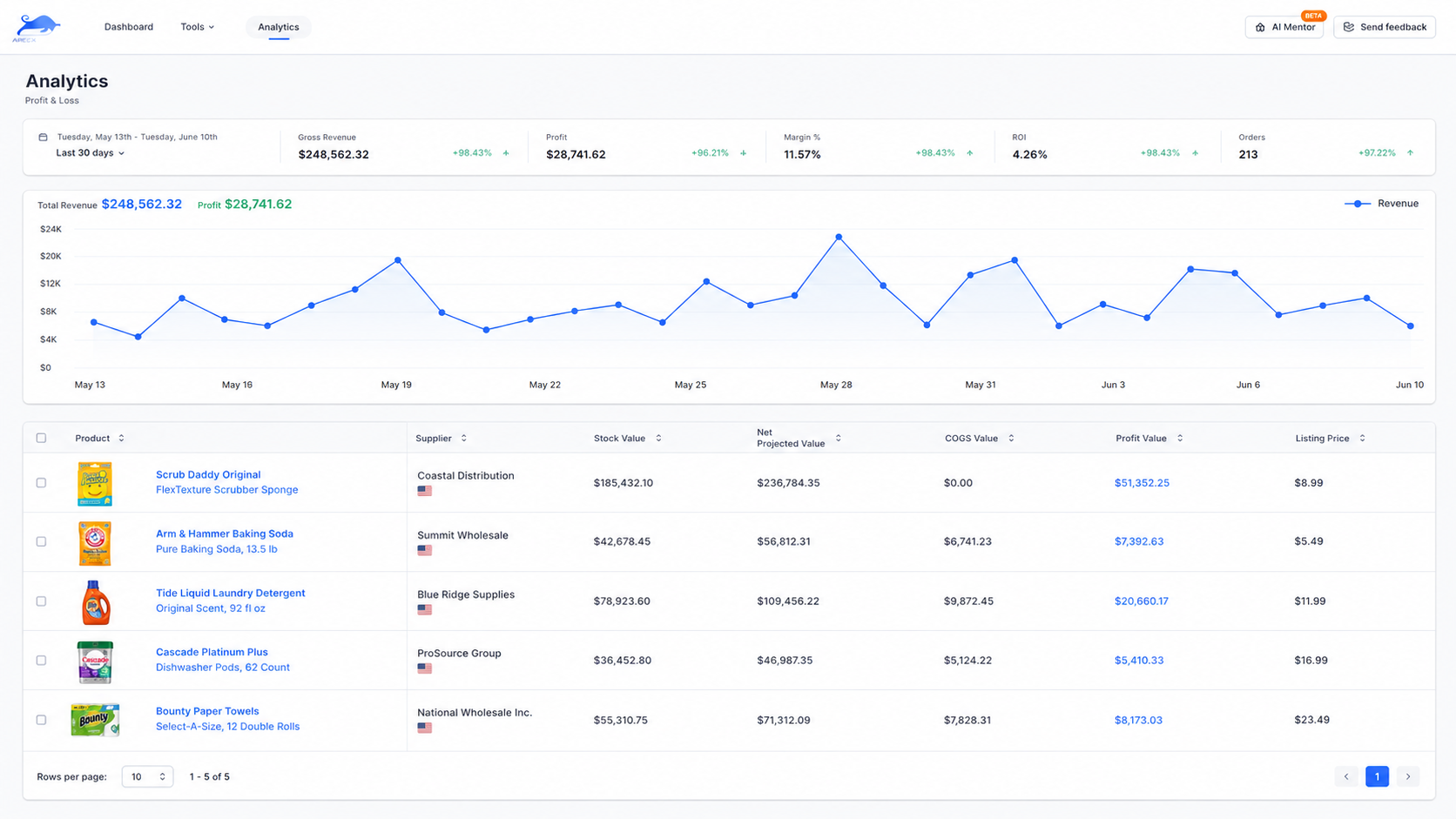
Landed cost math tells you what you expect to make. Actual profit and loss tells you what you did make, after returns, storage fees, and any price changes since the purchase order went out. Reviewing both side by side, ideally on the same dashboard, is what catches a slow margin leak before it becomes a real problem.
7. Set a reorder trigger before you run out
Ready to put this into practice?
Apex Black, Blue, Green & Red connect sourcing, purchasing, and profit tracking into one suite. Start your 7-day free trial, no card charged until it ends.
Start Free TrialFor any SKU that is selling consistently, set a reorder point based on your supplier's actual lead time, meaning the inventory level at which you place the next purchase order so a new shipment lands before you go out of stock. Amazon punishes stockouts hard. You lose sales velocity, which can hurt your organic ranking even after you are restocked.
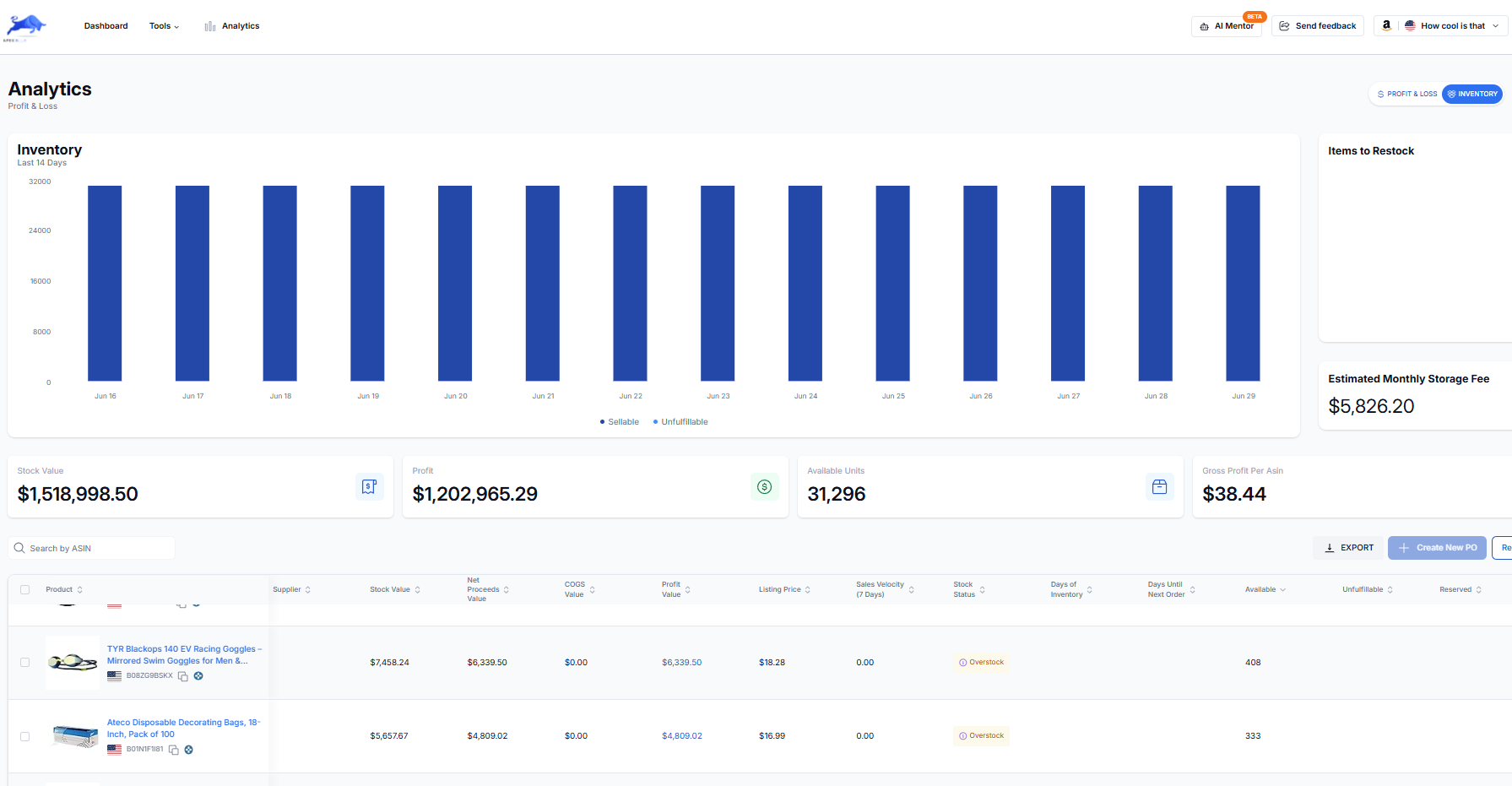
Real time visibility into current inventory across every prep center and warehouse is exactly what Apex Red's inventory tools are built to give you, so reorder points are not a guess.
What happens when purchase orders go untracked
Picture a seller running six suppliers off a shared spreadsheet nobody updates consistently. A shipment from one supplier is two weeks late and nobody notices until the listing is already out of stock. A different supplier quietly raised prices last month and the last three purchase orders were placed at the old assumed cost, so margin has been overstated for weeks. A third shipment arrived short by 40 units and the discrepancy was never disputed because it was never caught. None of these is a single catastrophic failure. Together, they are the ordinary, unremarkable way a wholesale business bleeds out. The sellers who avoid this are not smarter. They just built a system that surfaces these problems before they compound.
How experienced sellers run this differently at scale
Once a seller is running eight or more active suppliers, the workflow above stops being optional and becomes the actual job. Experienced sellers set a fixed weekly cadence, usually the same day every week, to review every outstanding purchase order, check restock alerts against actual sales velocity, and reconcile the prior week's landings against what was ordered. It is a boring, repeatable habit, and it is precisely the habit that separates a seller doing seven figures from one stuck at six because they are spending all their time firefighting instead of sourcing.
Why this workflow matters more as you scale
With one supplier and five SKUs, you can run this in your head. With eight suppliers and eighty SKUs, you cannot, and the sellers who stall out at that stage are almost always the ones still trying to. A connected system across sourcing, purchasing, and inventory is not a nice to have at that point. It is the difference between scaling and drowning in your own spreadsheets. See what that actually costs versus stitching together separate tools in our breakdown of what a typical seller software stack really costs.
Purchase order templates: what a good one actually includes
Whether you build one in a spreadsheet or use dedicated purchase order software, every wholesale purchase order should capture the same core fields: supplier name and contact, order date, expected ship date, expected landing date, unit cost per SKU, quantity ordered, total order value, and a running status such as submitted, in transit, or received. Sellers who skip any of these fields tend to be the ones who cannot answer a simple question, such as how much is currently outstanding across all suppliers, without opening several different emails to piece it together.
Frequently asked questions about Amazon FBA purchase orders
How do I create a purchase order for Amazon FBA wholesale?
A wholesale purchase order is an agreement between you and your supplier specifying the products, quantities, and agreed unit cost for a given order. It does not need to be complicated. What matters is that it is documented in writing, ideally with the supplier confirming the same terms back, and that it is tracked through to delivery rather than treated as complete the moment it is sent.
What is a good purchase order turnaround time for Amazon wholesale?
This varies significantly by supplier and product category, but most established distributors can ship a standard order within one to two weeks of confirmation. Sellers evaluating a new supplier should ask about typical turnaround explicitly before the first order, since a slow, unpredictable supplier can undermine an otherwise solid reorder strategy.
How often should I reorder inventory for Amazon FBA?
Reorder frequency should be driven by your actual sales velocity and supplier lead time, not a fixed calendar schedule. A fast moving SKU with a two week supplier lead time might need a reorder trigger set at three to four weeks of remaining stock, while a slower mover with the same lead time might only need to reorder every couple of months. The goal is always the same: place the next order early enough that a new shipment lands before the current stock runs out.
Ready to put this into practice?
Apex Black, Blue, Green & Red connect sourcing, purchasing, and profit tracking into one suite. Start your 7-day free trial, no card charged until it ends.
Start Free Trial